Have you ever unlocked your smartphone using your face or used an application that automatically identifies objects in a photograph? These technologies use an important branch of Artificial Intelligence known as Computer Vision.
Humans naturally recognize faces, objects, colours, and movements. But how can computers perform similar tasks?
Computer Vision allows machines to analyze and understand visual information from images and videos. It is helping transform industries such as healthcare, transportation, security, manufacturing, and education.
In this blog, let's understand what Computer Vision is, how it works, where it is used, and how beginners can start learning it.
1. What Is Computer Vision?
Computer Vision is a field of Artificial Intelligence that enables computers to interpret and understand visual information from the world.
It allows computer systems to identify objects, recognize patterns, detect faces, and analyze images or videos.
For example:
A smartphone recognizes your face to unlock the screen.
A traffic camera identifies vehicles on a road.
A shopping application allows users to search using images.
A medical imaging system helps analyze X-rays.
In simple words, Computer Vision teaches computers how to interpret visual information.
2. How Does Computer Vision Work?
Computer Vision systems use image processing techniques and Machine Learning models to analyze visual data.
The process generally involves these steps:
Step 1: Image Collection
The system receives visual information through cameras, uploaded images, or video recordings.
Step 2: Image Preprocessing
The image may be resized, adjusted, or converted into a suitable format for analysis.
Step 3: Feature Extraction
The system identifies useful visual patterns, such as shapes, edges, textures, and colours.
Step 4: AI Model Processing
A trained model analyzes the image and identifies relevant objects or patterns.
Step 5: Output Generation
The system produces a result, such as identifying an object, detecting a face, or classifying an image.
3. Important Computer Vision Technologies
Some important techniques used in Computer Vision include:
Image Classification: Identifies the category of an image. For example, determining whether an image contains a cat or a dog.
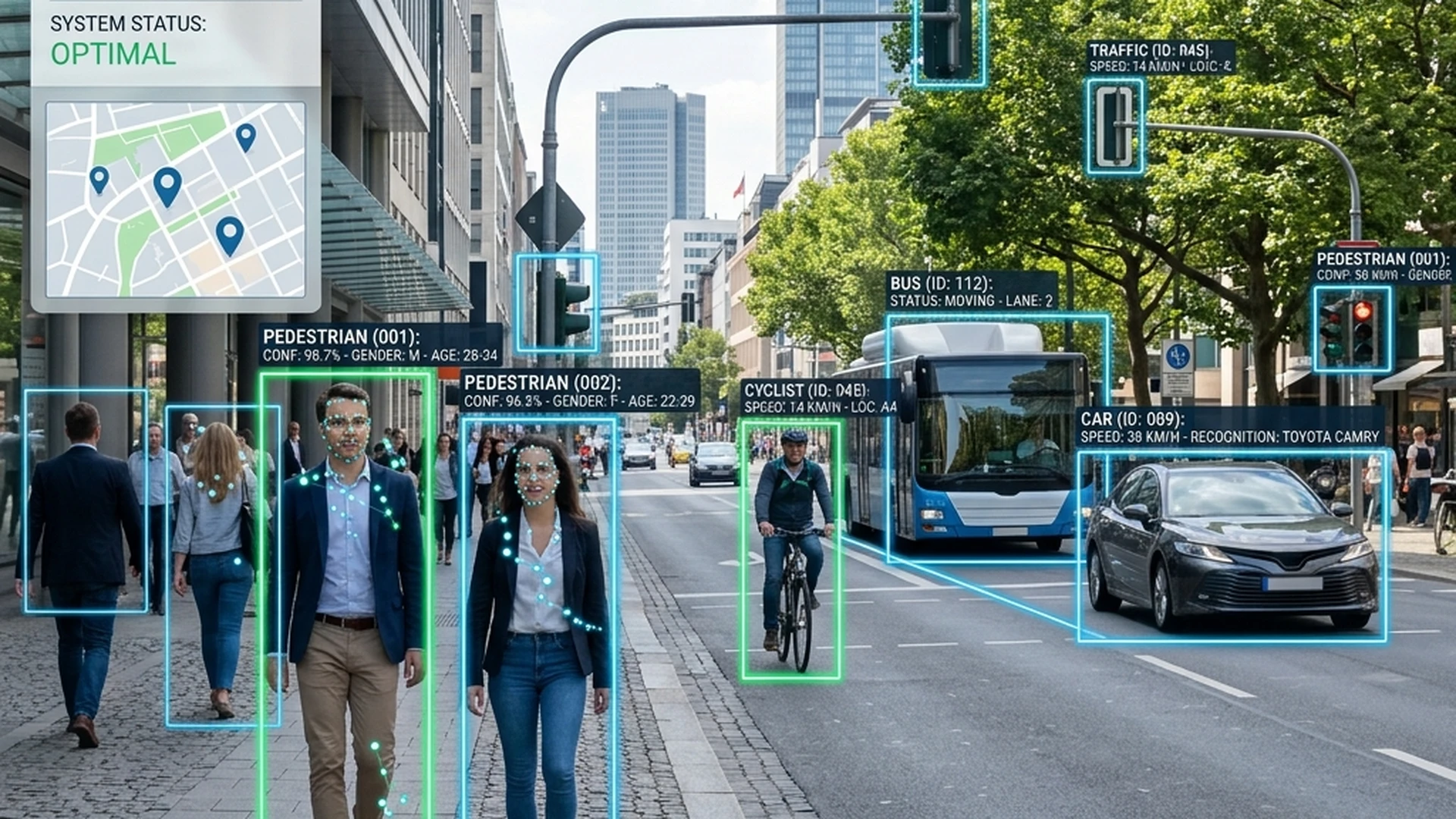
Object Detection: Identifies objects and their locations within an image. For example, detecting cars and pedestrians in traffic footage.
Image Segmentation: Divides an image into meaningful regions or pixels belonging to different objects.
Facial Recognition: Analyzes facial features to compare or identify faces, subject to appropriate privacy and security safeguards.
Optical Character Recognition (OCR): Extracts printed or handwritten text from images and scanned documents.
4. Real-World Applications of Computer Vision
Computer Vision is already being used across many industries.
A. Healthcare
Computer Vision can assist medical professionals in analyzing medical images, including X-rays, CT scans, and MRI scans. It can help identify patterns that require further examination by qualified professionals.
B. Transportation
Advanced driver-assistance systems use visual information to detect road signs, vehicles, pedestrians, and lane markings.
C. Retail and Shopping
Retail applications can use image recognition to identify products, organize inventory, and support visual product searches.
D. Security
Computer Vision can help monitor video footage, detect unusual activities, and identify objects in controlled security environments.
E. Agriculture
Image-based systems can help analyze plant conditions, identify visible crop damage, and monitor agricultural environments.
F. Education
Students can explore visual learning applications, image recognition tools, and interactive AI projects to understand Computer Vision concepts.
5. Computer Vision vs Image Processing
These two terms are related but have different purposes.
FeatureImage ProcessingComputer VisionMain purposeModify or improve imagesUnderstand visual informationFocusImage quality and transformationRecognition and interpretationExampleRemoving image noiseIdentifying objectsTechniquesFiltering, resizing, enhancementML, Deep Learning, image analysis
Image processing is often used as part of a Computer Vision workflow.
6. Which Technologies Are Used in Computer Vision?
Beginners interested in Computer Vision can explore these technologies:
Python: A popular programming language for AI development.
OpenCV: A library for image processing and Computer Vision.
TensorFlow: A framework for developing Deep Learning models.
PyTorch: A framework for building and training neural networks.
NumPy: A library for numerical operations.
Google Colab: An online environment for Python experiments.
These tools help developers build applications that can process and analyze images.
7. Beginner-Friendly Computer Vision Projects
Practical projects are a great way to understand how Computer Vision works.
Here are five ideas for students:
Face Detection System: Detect faces in images or live camera feeds.
Handwritten Digit Recognition: Identify handwritten numbers using an image dataset.
Object Detection Application: Identify common objects in photographs.
Image Classification System: Classify images into different categories.
OCR-Based Text Extractor: Extract text from scanned documents.
Students can begin with Python and OpenCV before exploring more advanced Deep Learning models.
8. Career Opportunities in Computer Vision
Students interested in this field can explore careers such as:
Computer Vision Engineer.
AI Engineer.
Machine Learning Engineer.
Robotics Engineer.
Deep Learning Engineer.
Image Processing Developer.
These roles generally require programming knowledge, mathematics, Machine Learning, and practical project experience.
Final Thoughts
Computer Vision is an exciting area of Artificial Intelligence that allows machines to interpret visual information and perform tasks that were once possible only through human observation.
From healthcare and transportation to agriculture and education, it is creating new opportunities for innovation.
For students, learning Computer Vision is a great way to explore how Artificial Intelligence works beyond text-based applications.
At AIVASU, we believe that practical learning helps students understand technology more deeply. Start with Python, experiment with images, build small projects, and gradually explore advanced AI applications.
Learn AI. Explore Computer Vision. Build the Future with AIVASU.