Change Platform:
Set GitHub Remote Origin
Now that your SSH key is added to GitHub, you can securely connect your local repository to GitHub using SSH.
Test Your SSH Connection
First, test that your SSH connection to GitHub works:
Example
ssh -T [email protected]
The authenticity of host 'github.com (140.82.121.3)' can't be established.
RSA key fingerprint is SHA256:nThbg6kXUpJWGl7E1IGOCspRomTxdCARLviKw6E5SY8.
Are you sure you want to continue connecting (yes/no/[fingerprint])? yes
Warning: Permanently added 'github.com,140.82.121.3' (RSA) to the list of known hosts.
Hi your-username! You've successfully authenticated, but GitHub does not provide shell access.
If the last line contains your username on GitHub, you are successfully authenticated!
Get Your Repository's SSH Address
On GitHub, go to your repository and click the Code button. Make sure SSH is selected, then copy the SSH URL (it starts with [email protected]:):
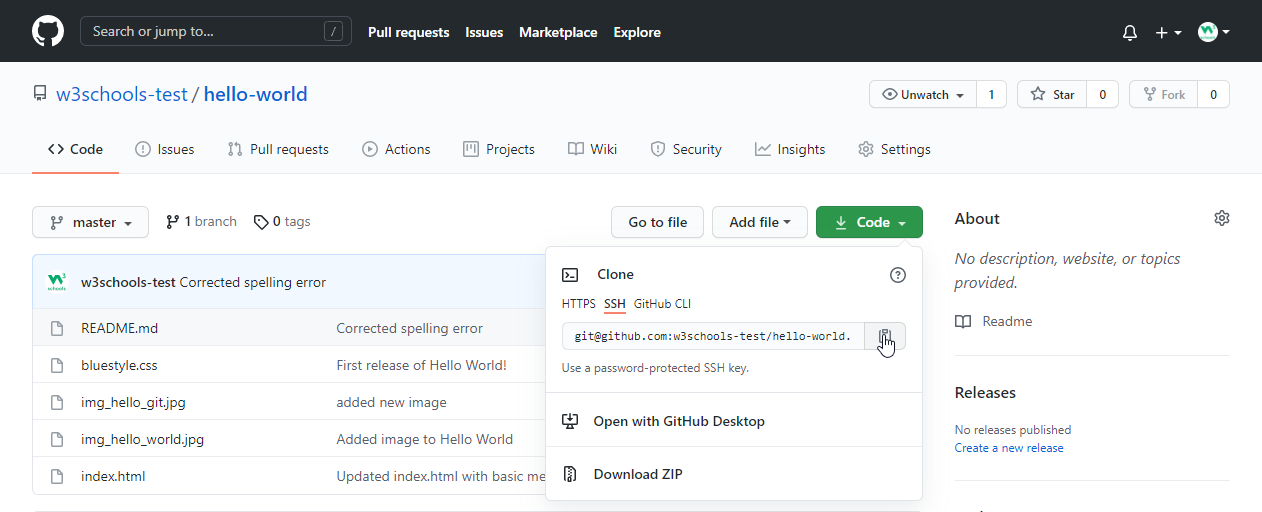
Add or Update the Remote Origin
To add the remote origin (first time):
Example
git remote add origin [email protected]:your-username/your-repo.git
To update an existing remote to use SSH:
Example
git remote set-url origin [email protected]:your-username/your-repo.git
Congratulations! You are now ready to use GitHub with SSH.